
CI/CD for dbt on Microsoft Fabric
What CI/CD is, and why dbt needs it
CI/CD stands for continuous integration and continuous delivery. Continuous integration means every code change is checked automatically before it joins the shared code. On every pull request, the pipeline checks that:
- The project still compiles, so every model and source it refers to exists
- The code follows the agreed conventions for naming, documentation and SQL style
- The changed models build and pass their tests, which also catches a query on a column that no longer exists
Continuous delivery means every change that passes reaches acceptance and production through the same scripted pipeline. A person may approve the release, but nobody deploys it by hand.
A mature dbt project needs both, because every model builds on other models. One renamed column in a staging model can break every model downstream of it, and the reports on top. CI catches that kind of break in the pull request, before the change reaches a shared environment. CD then deploys exactly the code that passed, the same way every time, so you always know which version runs in acceptance and production.
What good CI/CD looks like
Good CI/CD has five properties:
- Fast. A pull request gets feedback within minutes.
- Isolated. Every developer and every pull request works in its own space, so nobody's build overwrites someone else's tables, especially not during development.
- Reproducible. The same code and versions give the same result in every environment.
- Safe. Production only changes through reviewed and tested pull requests, and a failed check stops the release.
- Observable. After every run, you can see which checks ran, how long it took and what failed.
Luckily, dbt gives us the tools for all five. Over the next five chapters, we'll walk through how to design and integrate such a setup with dbt on Fabric.
1. Separate dev, accept and prod
The first step is to separate your environments within Fabric. Give every environment its own Fabric workspace. Fabric assigns roles and capacity per workspace, so separate workspaces keep access, compute and data apart. The number of environments, and what each one does, depends on the use case and its requirements. In this solution we work with four. We often recommend them as a first setup, but treat that as a starting point rather than a rule:
- Dev is for development. Developers build and test their changes here from their own machine. A daily scheduled run also checks that incremental models stay stable over consecutive runs.
- CI is where the pipeline builds and tests every pull request. After every merge to dev, the pipeline also builds the full dev branch here as the baseline to compare with. Nobody works in it, so a failing pull request never touches a workspace people use.
- Accept is an isolated test environment, where Fabric runs dbt on a schedule. A release stays there for a period before it reaches production.
- Prod is production: the data and reports the business relies on. Fabric runs dbt here on a schedule as well.
For the Git repository of your dbt project, we recommend one long-lived branch per environment: dev, accept and prod. CI builds the pull requests, so it needs no branch of its own. Feature branches start from dev, and every change moves up one branch at a time through a pull request. dbt Labs calls this strategy indirect promotion and compares it with the alternatives in their guide to Git branching strategies.
Every use case and integration still needs its own assessment, and the right design may need fewer or more workspaces or branches.
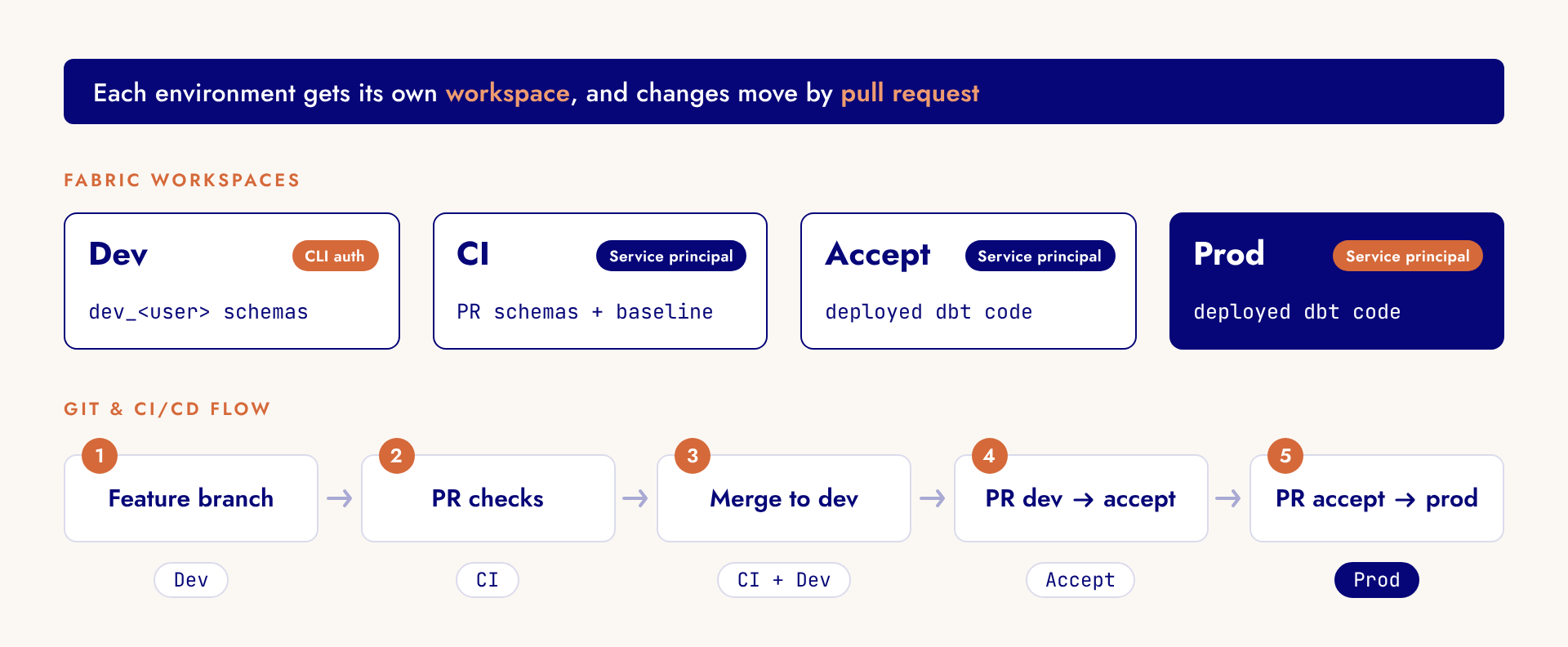
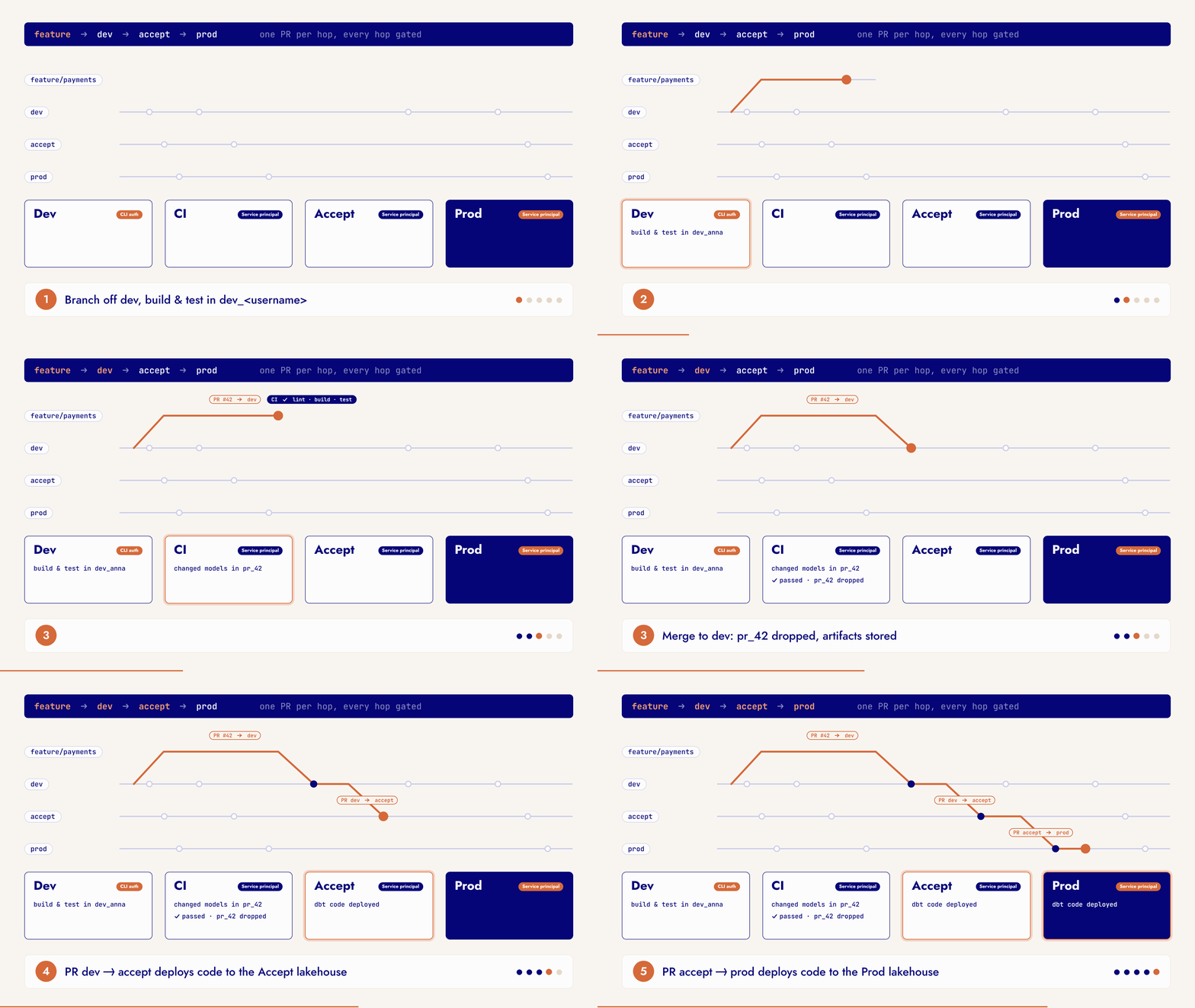
The resulting workflow looks like this:
- A developer creates a feature branch from dev, and builds and tests the change in their own schemas in the dev workspace.
- When the change is ready, the developer opens a pull request into dev. CI checks the code and builds the changed models in the pull request's own schema in the CI workspace.
- Once CI passes and the business or a named teammate has reviewed it, the pull request is merged into dev. Its schema in CI is dropped, the CI baseline is rebuilt, and the code is deployed to the dev workspace for the daily scheduled run.
- Every release cycle, a scheduled pipeline opens two promotion pull requests: accept to prod and dev to accept. CI checks them again, without a new build.
- A person then merges accept to prod first. The code that ran in acceptance during the last release cycle is deployed to the prod workspace, where Fabric runs it on a schedule. This merge can also run on a schedule.
- Then the same person merges dev to accept, so acceptance runs the new code until the next promotion. This merge can also run on a schedule.
Both GitHub and Azure DevOps can enforce the approval gate, where the business or a named teammate has to sign off. GitHub supports both branch protection rules and required reviewers on an environment. Azure DevOps offers branch policies, plus approvals and checks on environments.
2. Isolate work by schema and identity
In a lot of dbt projects, developers share the same dev warehouse or lakehouse. Each developer builds their own code, so they could overwrite their colleagues' tables and views. A single macro solves this by prefixing every schema with the developer's name, so staging_sales becomes dev_jdoe_staging_sales.
You can extend this to pull requests, so every pull request gets its own pr_<number> schema in the CI warehouse. The scheduled dev run, the CI baseline, acceptance and production keep the normal schema names.
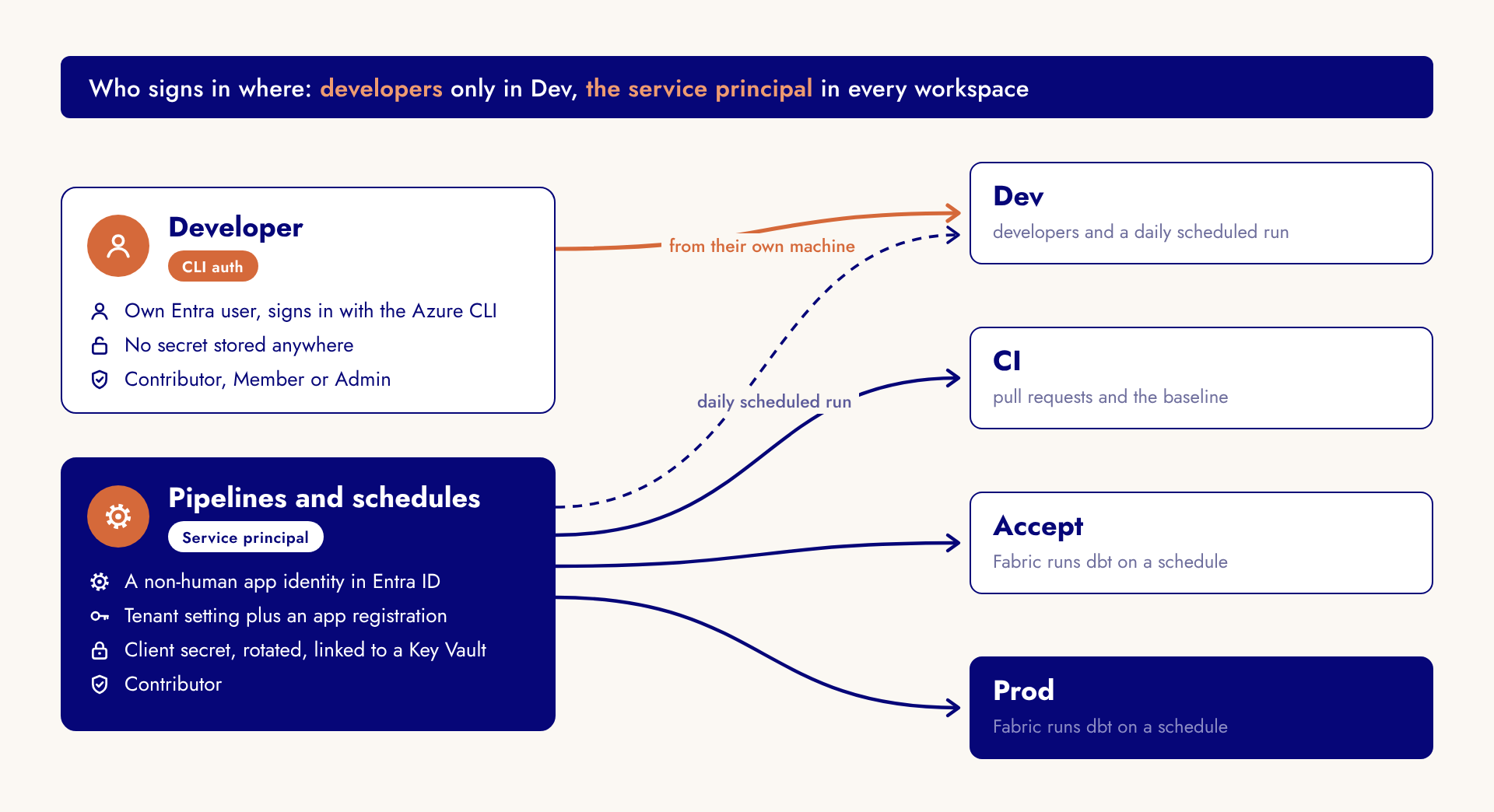
The identity half comes from the CLI authentication type in dbt-fabric, which signs in through the Azure CLI. Developers work interactively, and in dev they sign in with their own Microsoft Entra account. No secret is stored anywhere, and every query traces back to the developer. In CI, acceptance and production, a pipeline or a Fabric schedule runs dbt. Those runs should use a service principal, a non-human identity with Contributor rights on the workspace. Its secret never lands in the repository, and nobody needs personal write access to acceptance or production to ship a change.
3. Build only what changed, and defer the rest
This chapter covers one of dbt's strongest CI/CD features: running and testing only the models whose code changed, and deferring the rest to data in another environment instead of to the data in dev.
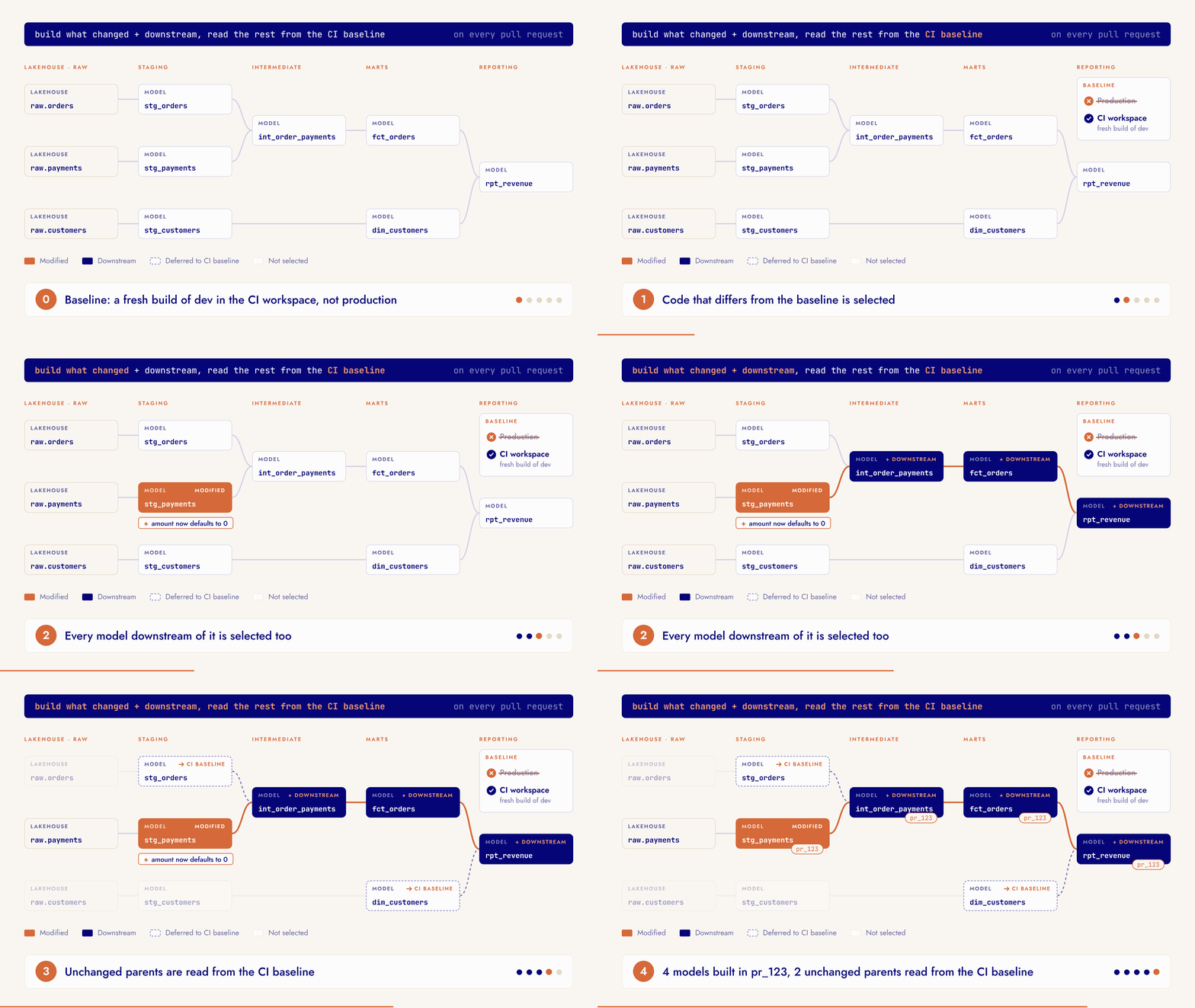
Changed code is best validated in a separate environment. Still, a pull request that changes one model should not rebuild the whole project. dbt's state comparison avoids that. It compares the pull request with the manifest of the CI baseline. The manifest is a file in which dbt describes the whole project as it was built: every model, test and macro, with its code and settings. Only the models that differ are selected, plus everything downstream of them. Do not confuse this state comparison with dbt State, a separate, paid product from dbt Labs. State comparison is part of dbt Core, costs nothing, and is all that slim CI needs.
When only part of the project is built, the unchanged parents (the models the changed model reads from) still have to come from somewhere. They are usually not in the pull request's own schema. Deferral takes care of that: every reference to a model that was not built resolves to the table recorded in that same manifest, so CI reads it instead of rebuilding it. Deferral is part of dbt Core and works with dbt-fabric, but only to tables in the same Fabric workspace.
The usual advice is to defer to production. On Fabric, we keep the baseline in a dedicated CI workspace instead, for three reasons:
- No pipeline builds production. Fabric runs dbt in acceptance and production on its own schedule, so no pipeline can publish a manifest that matches those tables.
- Cross-database queries stay inside one workspace. CI reads the sources and the deferred tables with three-part names, and Fabric only resolves those between items in the same workspace. The CI warehouse therefore sits next to its own copy of the sources.
- The baseline rebuild stays out of sight. Every merge to dev rebuilds the whole baseline, which should never happen in a workspace people read.
Two rules keep this safe. First, defer only to a manifest from a run that built its tables. A manifest from a compile run only describes code, so CI would fail on columns that were never built. Second, let CI prefer the baseline's tables over older tables in the pull request's own schema, so a pull request never mixes in tables left behind by its own earlier pushes. A cleanup job drops the PR schema when the pull request closes.
The combination of state comparison and deferral is known as slim CI. A change to one staging model builds that model and its descendants in the pull request's own schema, and everything else is read from the baseline. Feedback comes within minutes, and the change is still tested against real tables.
4. Let quality gates only tighten
Next to slim CI, every pull request runs three quality gates on the code itself: a parse of the project, convention checks and SQL linting. They run before the slim CI build, so a broken pull request fails within minutes, before any build time is spent.
For the convention checks we normally use dbt-project-evaluator. It now supports Fabric, but only with a newer version of the dbt-fabric adapter, and that version is not stable yet.
So, for now, we use dbt-bouncer instead, a Python tool that runs similar checks on the manifest alone, without a database connection. It can check naming per layer (stg_, int_, ads_, dim_ and fact_) and a description on every model and source. Every source, and every silver and gold model, also needs an owner.
Keep these gates in CI rather than in pre-commit hooks. They need a resolved project and manifest, which would make every commit slow.
The three gates:
- Parse. dbt reads the whole project and fails on broken references, invalid YAML or a wrong configuration.
- dbt-bouncer. Checks the project's conventions, such as naming, descriptions and owners, on the manifest.
- SQLFluff. Lints the SQL as dbt renders it, so style problems fail in the pull request.
5. Ship code, let Fabric run it
After every merge into dev, accept or prod, the deployment job compiles the project to validate it and uploads it to the workspace's lakehouse through a OneLake API. A file-count check and a completion marker make sure Fabric never starts on a half-deployed project.
Inside Fabric, a Python notebook picks up the project and runs dbt on a schedule. It fits the job: dbt only sends SQL to the warehouse, so one small node is enough, and a Spark session would be overkill.
As of November 2026, we are still waiting for Microsoft to release Environment support for Python notebooks, even as a preview. That one change would make the design a bit more elegant: dbt-core and dbt-fabric would be installed once in an Environment together with the dbt project, and every scheduled run would start on the same runtime.
Fabric also offers its own dbt job. It runs a dbt project straight from the workspace on a runtime that Fabric manages, so no notebook or package installation is needed.
The accelerator: all five practices in one repository
At Plainsight, we know CI/CD is not an easy thing to implement. That is why we packaged these five practices into our fabric-dbt-accelerator, a GitHub repository we set up at the client when a project starts. It holds a working dbt project on demo data, the pipelines for GitHub Actions and Azure DevOps, and Terraform for the four workspaces and their access.
As we said earlier, every use case and integration needs its own design. So we built the accelerator to hold more than most projects need: removing what you don't use is easier than building what is missing.
If you want dbt on Fabric with CI/CD from day one, get in touch and we will set it up with your team.
Keep reading
 Data Engineering
Triggering and Monitoring a dbt Cloud Job with Azure Data Factory
Ready to master your data pipelines? Dive into our latest blog to discover how Azure Data Factory can trigger and monitor dbt Cloud jobs. Learn how to…
 Power BI
Efficiently Managing Version History and Deployment in Power BI
How to choose a version history and deployment setup for Power BI that fits your team: PBIP and TMDL in Git, deployment pipelines, quality gates and shared models.
How to Simplify Deployment Pipelines: One Parameter to Rule Them All
Replace a parameter per data source with one environment parameter and a small Power Query function, so a Power BI deployment pipeline needs one rule per stage.
Want to implement this in your workflow, too?

Philipp Engels
Philipp started in physics and pivoted to data through a Master's in Statistical Data Analysis at Ghent University. He spent several years at Capgemini working on Azure and Databricks for clients like Proximus, Coca-Cola, Aldi, and Atlas Copco. His master's thesis used machine learning to predict disruptions in nuclear fusion plasma, which is a solid conversation starter.