
How Microsoft Fabric Simplifies Data Integration Across Your Organisation
Getting data available across the whole organization sounds like a solved problem. Then you try it: five tools, three vendors, scalability limits, security questions, and an architecture diagram nobody can explain in one meeting. Having a data expert on board helps a lot, but you may have wondered whether the whole thing could just be simpler. It can. Microsoft Fabric removes a large part of that complexity, and this post shows where.
Unified Data Management
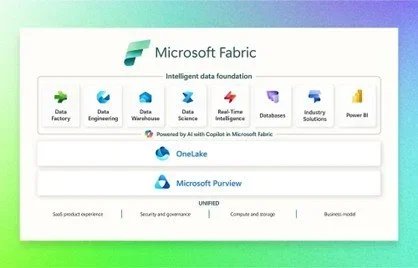
Fabric covers the whole data lifecycle, from ingestion to visualization, on one platform. The centerpiece is OneLake: one repository for all your organization's data, accessible from a single location. That removes data silos and makes it much easier for departments to work from the same, consistent data.
 Source: microsoft.com
Ingestion, preparation, storage, analysis, and visualization all live in that same platform. You no longer need a separate ETL (Extract Transform Load) tool, a separate data lake, separate governance tooling, and a separate machine learning platform; those functions are built into Fabric.
And because Fabric plugs into Microsoft 365 and Azure, people keep working in tools and environments they already know. That alone saves a lot of adoption pain.
Automated Data Integration
Traditional data integration means wiring several systems and tools together. Fabric centralizes the sources in OneLake, which acts as the single source of truth: data from all kinds of systems, reachable through one interface.
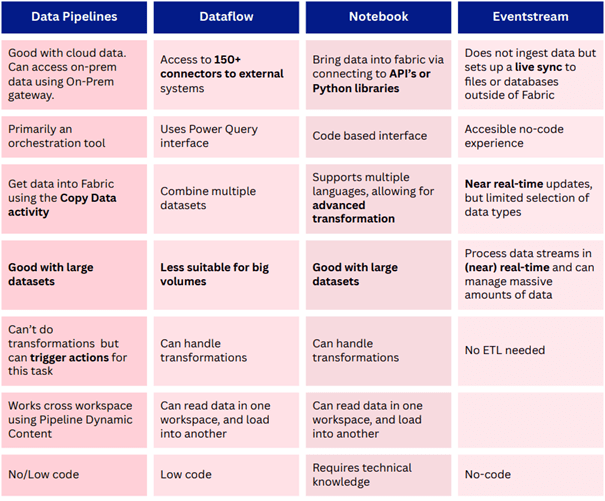
On top of that, Fabric gives you four tools to automate the integration itself: Data Pipelines, Dataflow Gen2, Notebooks, and Eventstream.
Data Pipelines orchestrate complex data workflows, automating how data moves and transforms across stages.
Dataflow Gen2 is a low-code environment for building transformation logic. If you know Power Query in Power BI Desktop, you will feel at home immediately.
Notebooks are the code-first option for advanced processing and analysis, in languages like Python and SQL.
Eventstream lets you set up live sync to files (OneLake Shortcuts) and to databases outside of Fabric (database mirroring). You skip actually ingesting the data and still get near real-time updates.
Between the low-code and code-first options, there is a fit for every level of experience, so both technical and non-technical people can build and maintain integrations.
Which tool for which job? The choice affects your workflow and the performance of the end result. These criteria help you decide.
Real-Time Intelligence
 Source: microsoft.com
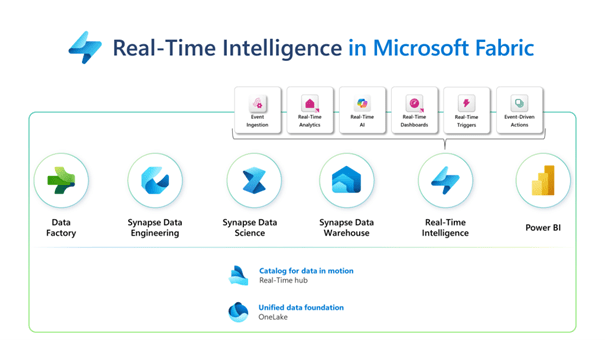
Real-time data benefits from the unified setup too. Real-Time Intelligence is a tenant-wide platform for discovering, ingesting, managing, and consuming data from many sources. It builds on the no-code, self-service experiences of Real-Time Analytics, Data Activator, and Power BI, so you can build real-time solutions without hunting for hard-to-find specialists.
Fabric also favors event-driven over schedule-driven integration. Data gets processed and analyzed as it arrives instead of waiting for the next scheduled run. The numbers you look at reflect what is happening now, not what happened last night, and your organization can respond while it still matters.
Because everything sits in one place, every department works from the same up-to-date information.
Integration with AI and Machine Learning
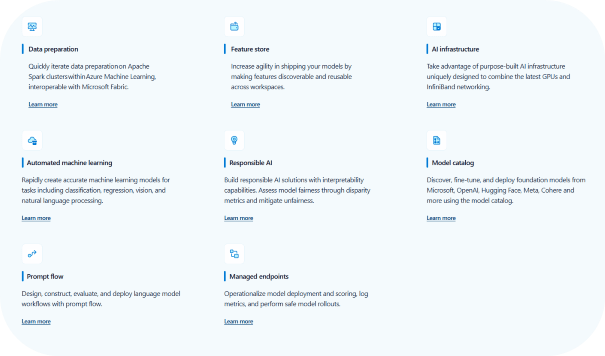
Fabric integrates with Azure Machine Learning and other AI services, so you can build, train, and deploy machine learning models directly within Fabric instead of bolting AI onto your data workflows separately. That lowers the barrier considerably, also for people with limited technical background.
Because it runs on Azure's cloud infrastructure, your models scale to large datasets and heavy computation. That matters once AI moves beyond the first pilot and into multiple departments and use cases.
 Source: microsoft.com
The AI and ML capabilities work with your existing tools and workflows, so AI-driven insights land in the business intelligence dashboards, reports, and applications your teams already use, not in yet another separate tool.
Wrap up
Microsoft Fabric launched in May 2023. The promise: one platform from data ingestion and governance to analytics, usable not only by data scientists but by everyone in the organization who needs data. In practice that means less tooling to maintain, fewer handovers between systems, and advanced capabilities within reach of ordinary teams.
Curious what Fabric would look like on your data? Let's talk.
Want to implement this in your workflow, too?

Femke Coenye
Femke is a certified Power BI Data Analyst with a background in front-end development and UI/UX design. She brings a visual eye to reporting that most data consultants don't have, which means her dashboards don't just work, they look like someone actually thought about the person reading them.