From Technician Notes to PDF: Automating Incident Reporting
introduction
A customer experiences a network issue late at night and calls the on-call technician. The technician arrives on-site, identifies the faulty component, replaces it, and restores service. Before leaving, they log all relevant details into the ticketing system: time of call, materials used, repair type, and even photos.
The next morning, the customer receives a clean, branded PDF in their inbox. It clearly explains what happened, when it was resolved, and how it was fixed, complete with visuals and contact information for follow-up.
This is how incident reporting should work: clear, fast, and automatic.
Technician input often stays buried in a database or within the ticketing system. It's inaccessible to the customer and hard to retrieve for internal teams.
That’s a missed opportunity.
Clear incident reports not only help customers stay informed, but also build trust, support compliance, and provide a record of quality service.
In this blog, we’ll explain:
Why automating incident reports matters for technicians, customers, and support teams
How we built a system that turns raw ticket data into professional, branded PDF reports
The steps we took to handle real-life challenges like timestamps, attachments, and customer-specific fields
Whether you're in IT service delivery, facilities maintenance, or customer support, this approach might save you hours of manual reporting work every week.
Why Manual Reporting Doesn’t Scale
Technicians in the field are already doing the hard work (fixing issues on-site, entering key data, taking photos) often using tools like Xurrent or another service management platform. But collecting that data is only the beginning. Clients expect a professional report afterwards, and that’s where things used to get slow and messy.
Common pain points:
Data comes in as raw JSON: not human-friendly
Timestamps are in UTC — not local time
Photos are stored as separate attachments
Different customers want different fields and labels
Reports had to be built manually (or not at all)
It was clear we needed a way to automate this — reliably, cleanly, and without losing flexibility.
Building the Automated PDF Report System
We developed a Python-based backend system that does the heavy lifting:
1. Fetching Completed Tickets
We connect to the ticketing system (via API) and pull all solved tickets. To avoid duplicates, we check which ticket IDs have already been processed.

2. Parsing Field Data
The custom fields filled in by technicians (e.g. time of call, arrival time, materials used, etc.) are extracted and normalized. Timestamps are converted from UTC to local Belgian time (+2h), and fallback logic ensures unknown fields don’t crash the flow.
3. Adapting to Customer-Specific Needs
Different customers use different terminology, logos, and expectations. For example: One customer calls their reference "cc_nummer"; another uses "jira_ticket_number".
Even logos, SLA thresholds, and contact info differ, so flexibility was key. We solved this by using a simple but powerful mapping dictionary for each customer.
This way, the system automatically knows which fields and assets to use for which customer without needing future manual changes. We apply similar logic for branding, SLA evaluation, and contact details.
Image Attachments Made Easy
Technicians often upload photos from the site: broken parts, repair steps, and final results. These images are:
downloaded via secure URLs
locally cached
embedded cleanly into the PDF report in relevant sections
This ensures customers get clear visual proof of the intervention.
Professional PDF Generation
We use HTML templates (with Jinja2) to dynamically fill in ticket data and layout. The HTML is then converted into a styled PDF using xhtml2pdf.
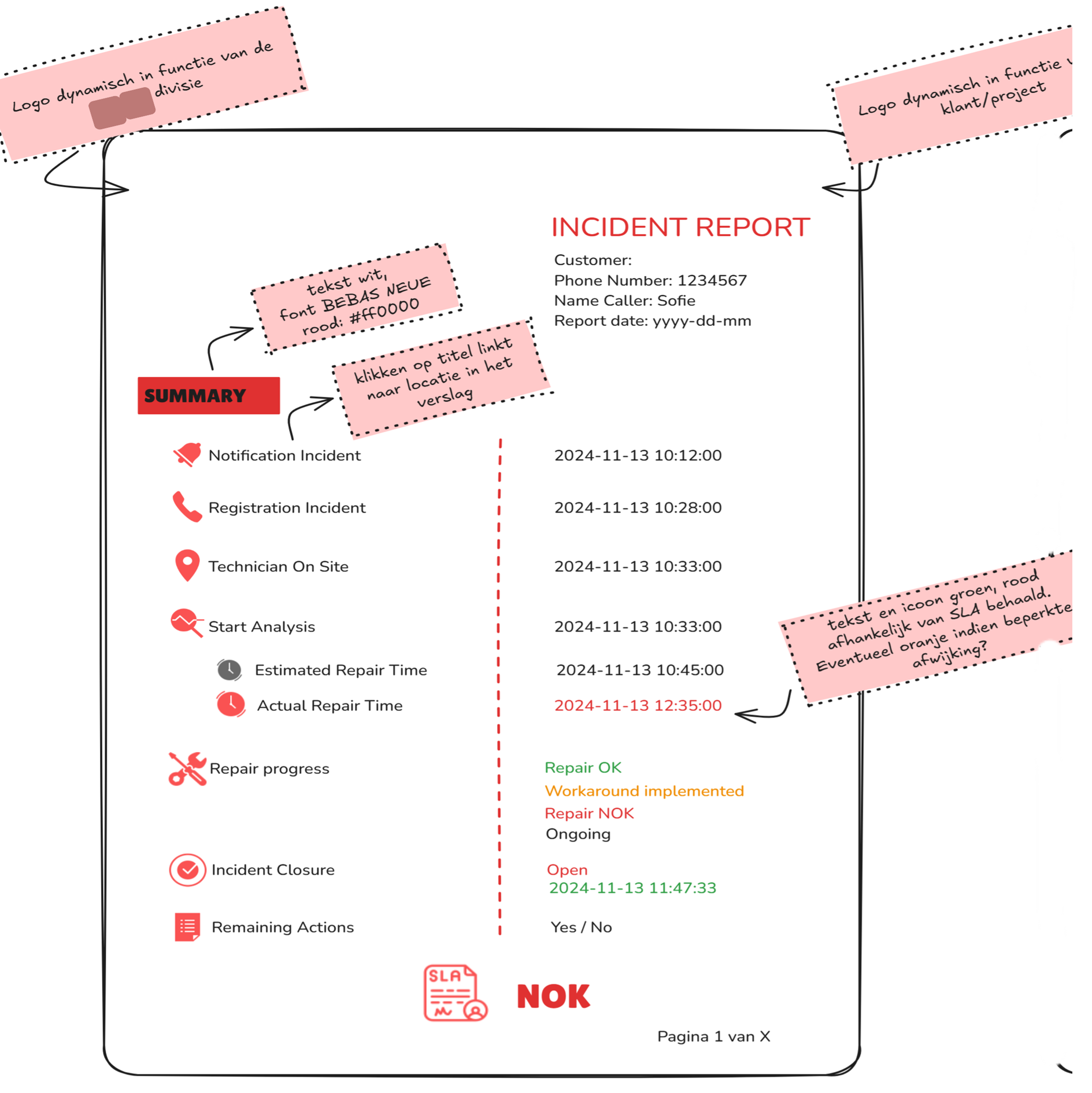
Each report includes:
Company branding (logo, header color, fonts)
Technician and SLA info
Full timeline (call, arrival, resolution)
Photos and materials used
Summary and remaining actions
A QR code linking to the original ticket
After generation, the PDF is uploaded to Azure Blob Storage for archiving or sharing. The ticket status is updated in SQL, so it's never processed again.
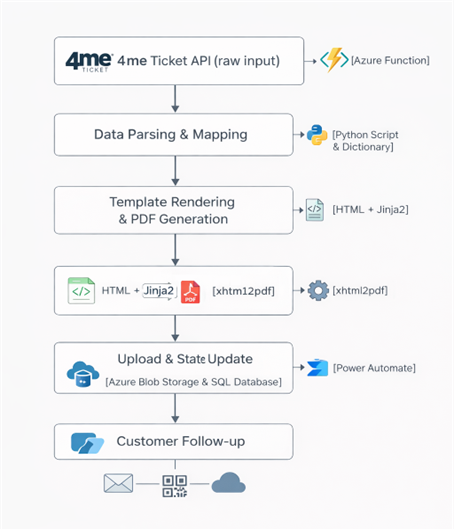
An Azure Function ensures that unprocessed tickets are picked up and handled automatically at the same time every day, fully hands-off.
Fully Automated, Fully Scalable
Once configured, the system runs completely on its own, whether 5 or 500 tickets are solved in a day. Each one gets:
Automatically detected
Parsed and processed
Branded and saved as a PDF
Optionally emailed or archived
This automation:
Saves hours of manual report-building per week
Reduces errors
Ensures consistency
Gives customers exactly what they need: clarity and visibility
To make this more visual, here is the layout framework we used:
Beyond Technician Input: Other Use Cases
While the system was originally designed for technicians completing on-site jobs, its structure is flexible and opens doors for broader applications:
Other possible use cases:
Customer-submitted defect reports
(e.g. photos from users → automated report for support teams)Preventive maintenance logs
(e.g. routine checks entered in a form → standard PDF summary)Installation reports
(e.g. new hardware installations with documentation + photos)Compliance & security audits
(e.g. checklist input converted to official audit report)
With minimal adjustments, this framework can support nearly any situation where structured input becomes professional output.
Final Thoughts
This project shows that automation isn’t just about saving time, it’s about improving communication. By turning technician input into structured reports, we give customers the visibility they want, and teams the peace of mind they need. Most importantly, we made it flexible enough to work for any customer, not just one. And with the potential to extend it beyond technician input, we’re only scratching the surface.
So whether you're in IT, telecom, or field service, ask yourself:
How much time is spent building reports manually?
Could your clients benefit from clearer documentation?
And what would it take to automate your reporting pipeline?
Call-to-Action
Already doing great work in the field and want to build something similar for your field teams or customers? Let’s make sure your reports show it.
Let’s talk, or reach out if you’re curious how this could work in your setup.