
Reporting on Harvest with Power BI
We published a free Power BI app for Harvest in the Microsoft AppSource: Harvest Reporting. This is the accompanying walkthrough: what the app does, and how to connect it to your Harvest account.
What is Harvest?
Harvest is a popular time-tracking and timesheet registration tool. Teams and individuals use it to log work hours, track project progress, and generate detailed timesheet reports. Businesses rely on it for accurate billing and to see where their time and people actually go.
What is Power BI?
Power BI is Microsoft's business intelligence and data visualization platform. It connects to a wide range of data sources, transforms the data, and turns it into interactive dashboards and reports. Organizations use it to monitor their key performance indicators (KPIs) and base decisions on data.
Added Value of importing Harvest into Power BI
The app connects the two tools. It extracts data from Harvest, such as logged hours, project details, and team performance metrics, and feeds it into Power BI, where you can build dynamic, customizable reports on how time is spent. That means monitoring time-tracking trends in real time, visualizing project performance and team productivity, and tightening up resource allocation and billing.
Use Cases
Below are some of the reports and use cases that have been tackled with Harvest as a source.
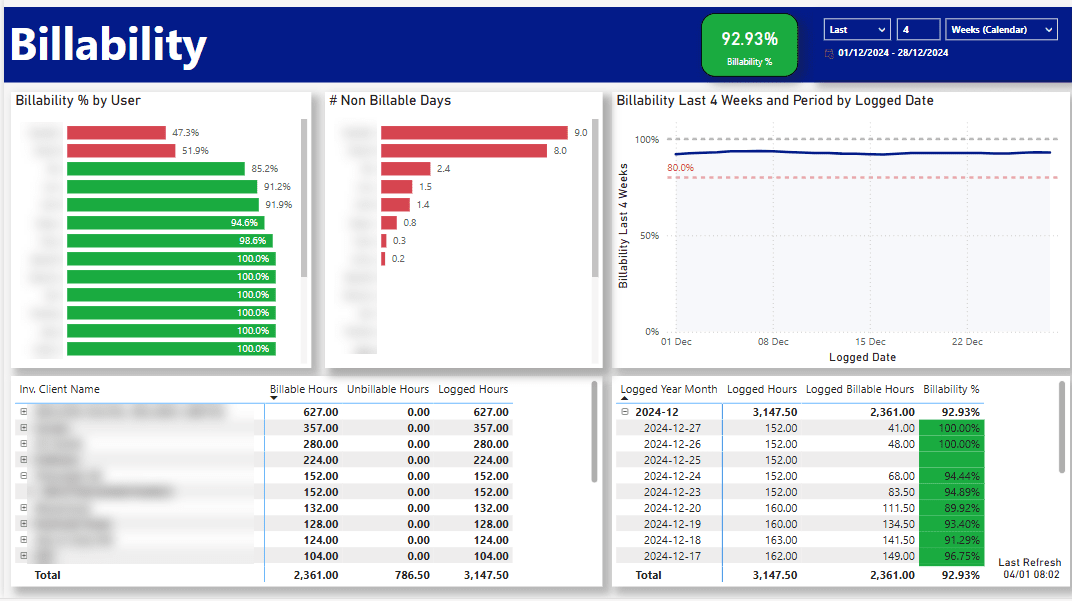


Authenticating to Harvest from Power BI
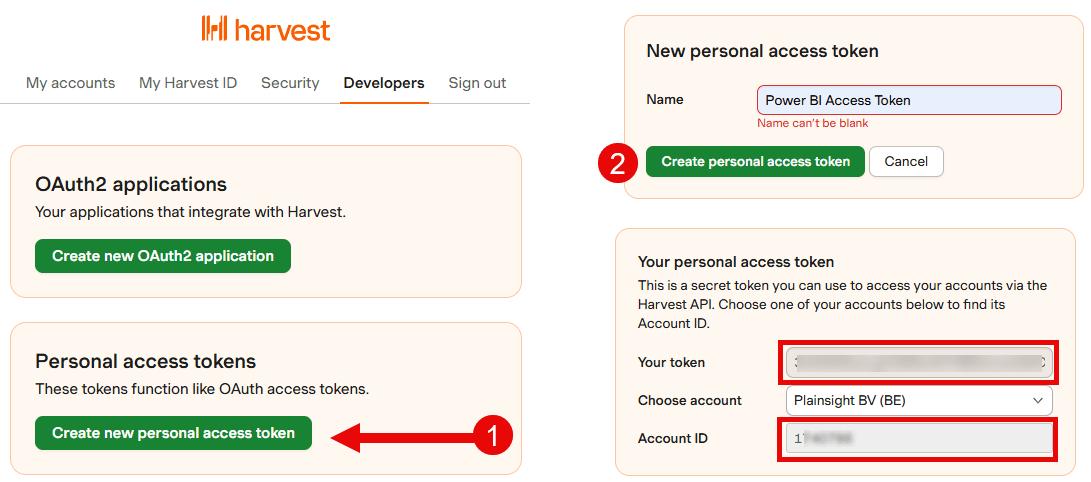
Follow these steps to authenticate the app to your Harvest account:
Go to the Developer section in Harvest: https://id.getharvest.com/developers
Press the button "Create New Personal Access Token"
Give the access token a name, for example: "Power BI Access Token"
You'll be granted the following information:
Token: this is the access token generated purely for this connection. Write it down and keep it secret. An example could be 3445xxx.pt.xxxxx-xxxxWA0lw
Account ID: this is the id of the account in Harvest. It typically consists of a few numbers, such as 1234567
With these two pieces of information in hand, go back to your app and enter them in the Power BI Template app.
Wait, I need more information!
The app covers the basics. Contact us if you need more advanced functionality, such as:
Reporting on admin functionalities: billable rates, project estimations, expenses, invoices, estimates, ...
Working with multiple tenants: more than one company usually means more than one tenant. We have a solution for that.
Sickness / Bradford reporting: this report page gives you a good glimpse of the insights you can get on illness.
Combining Harvest with other sources: Harvest might not be your single source of truth. We can help bring in more sources.
Integrations with other systems: at Plainsight, we use the time allocated to projects in Harvest to allocate financial costs to those projects in our accountancy program. Ask us if we can assist with that.
Performance improvements / incremental refreshes / technical problems: if you need a faster solution, want to implement incremental refresh or other technical improvements, we can help.
Send your inquiry by email to info@plainsight.pro.
Want to implement this in your workflow, too?

David Loos
David is co-founder of Plainsight and has been in data and analytics for well over fifteen years. He's held every role from developer to program manager, and has led data strategy and architecture for organizations like Delhaize, VDAB, Fluvius, and Barco. He completed Vlerick's Advanced Management Programme, which says as much about how he thinks about business as it does about data.