
Generative AI in Azure: What to build, when and why
Many companies want to adopt Generative AI but struggle to choose the right path. They're often unclear about what they need, and unaware of the limitations of the tools they pick.
This post breaks down the main Azure GenAI options, from chatbots to AI agents: what each tool is best suited for, and when (and when not) to use it. We cover them from the least flexible to the most flexible and share their capabilities and limitations along the way.
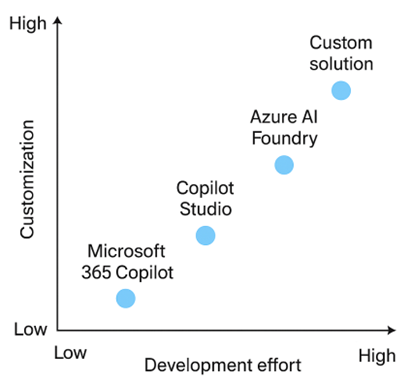 Source: Plainsight
Microsoft 365 Copilot
Microsoft 365 Copilot is an off-the-shelf AI assistant built into Word, Excel, Outlook, and Teams, using GPT-4 and your Microsoft 365 data. It helps users automate daily tasks like summarizing meetings, drafting content, and analyzing spreadsheets. Your team interacts with it directly in Office apps with no setup or coding required.
Use this tool when:
? The tool needs to be ready-to-use within Microsoft 365
? You want to interact with it directly inside Word, Excel, Teams, etc.
? You don't need deep customization or external integrations
? A custom frontend to interact with is not required
? You don't care about which LLM was used
? You don't want to capture feedback on the quality of the provided answers
Example use cases:
Summarizing meetings in TeamsDrafting emailsAnalyzing spreadsheets
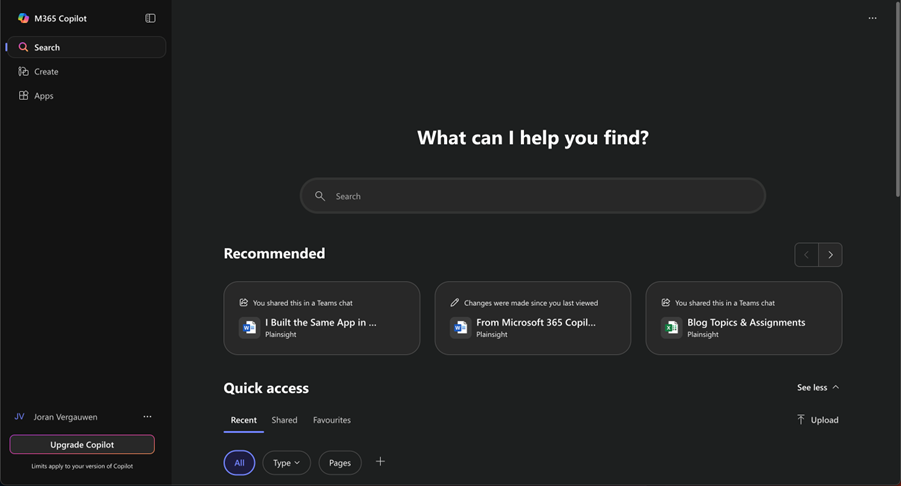 Microsoft 365 Studio (Source: Microsoft)
Copilot Studio
Copilot Studio is a low-code platform to build and customize chatbots or copilots that can connect to APIs and business systems. It's ideal for internal tools like HR or IT assistants and can be published to Teams or websites. Power users and low-code developers use a visual editor to configure flows and responses. The solutions are very similar with little flexibility in their "look and feel". Pricing wise, you can either opt for a $200 plan to get 25,000 messages/month, or you can opt for the pay-as-you-go model, where you pay a fixed cost of $0,01 per message.
Use this tool when:
? Limited customization needs to be done by non-developers
? You want to publish to Teams, websites, or Power Apps
? You want some control over logic and data connections
? A custom frontend to interact with is not required
? You don't require full agent behavior in your solution
? You don't need full transparency into how the model made its decisions
Example Use Cases:
HR bot in TeamsIT Helpdesk bot in Teams
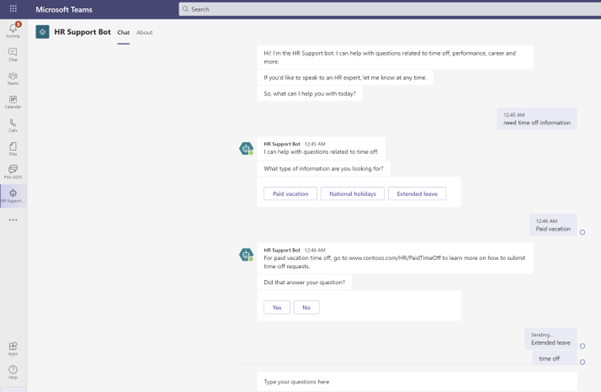 Example chatbot made by Copilot Studio (Source: Microsoft)
Azure AI Foundry (Rebranded Azure AI Studio)
AI Foundry is Microsoft's enterprise framework for building secure, scalable GenAI apps with RAG, orchestration, and plugins. It's great for creating domain-specific copilots using private data, with governance and observability built in. Your AI or platform team uses Azure-native templates and tools to develop and deploy.
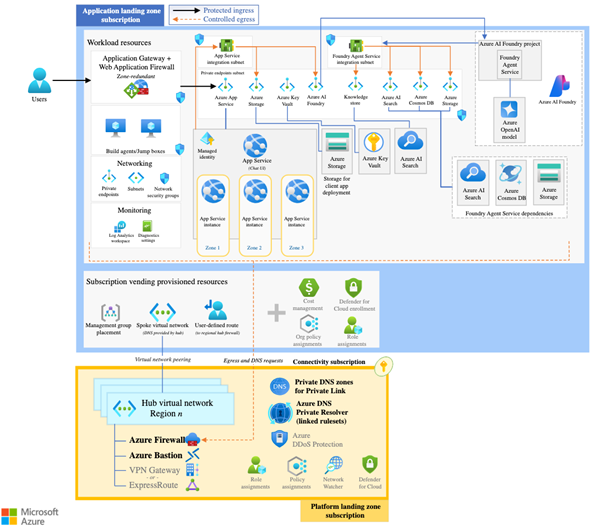 Chatbot Architecture (Source: Microsoft)
Use this tool when:
? The tool needs to support advanced orchestration and plugins
? You want to integrate deeply with Azure AI Search and OpenAI
? You want a managed yet flexible enterprise GenAI framework
? You need transparency into how the model made its decisions
? You don't require total control over every LLM prompt and interaction
? You don't need to use arbitrary open-source models or self-hosted runtimes
? You don't need to fully redesign the UI or interaction model
Example Use Cases:
Advanced HR bot hosted on a web appInternal chatbot agent that talks about different topicsVoice bot to assist mechanics while repairing machinery
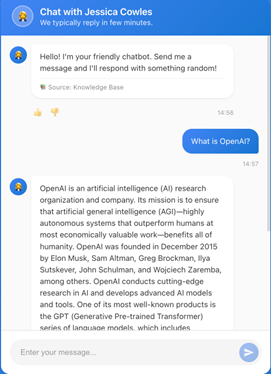 Custom chatbot UI (Source: Plainsight)
Custom Approach
The custom approach gives you full control using Azure OpenAI, LangChain or Semantic Kernel, AI Search, and any frontend or OSS model. You can build multi-agent systems, advanced RAG pipelines, and custom workflows. Engineers and architects fully own development, orchestration, and deployment.
Use this tool when:
? The tool needs to be fully customizable and modular
? You want to choose your own models, vector DBs, and UI
? You want full control over memory, planning, and tool use
? You don't care about Microsoft-first integration or templated deployment
? You want to use open-source models, but not just any model off the shelf
? You don't require a fast out-of-the-box user experience
Example Use Cases:
Travel planner Copilot with customized setupInternal chatbot agent with fully customized backendFully private chatbot for very sensitive data
Wrapping it up
This guide should give you a clearer understanding of the strengths, limitations, and typical use cases of Microsoft 365 Copilot, Copilot Studio, AI Foundry, and custom GenAI solutions. The right choice is rarely obvious, but it makes a real difference in how quickly a Generative AI project starts paying off.
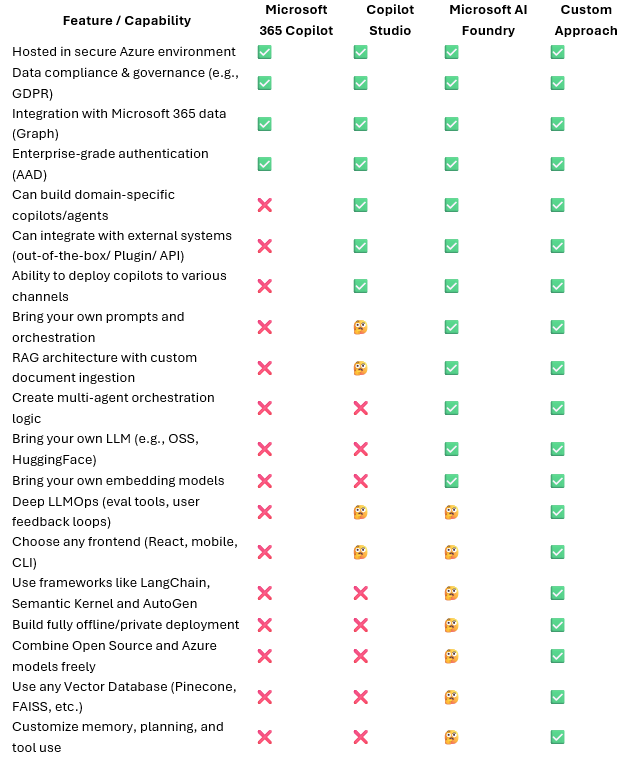
Below, you'll find a summary table that compares each option side by side.
If you have any questions about the blog, the comparison table, or how these tools relate to your specific use case, feel free to reach out. And if you're looking for support in bringing your Generative AI projects to life, we're happy to help.
Summary Table
Want to implement this in your workflow, too?

Joran Vergauwen
Joran studied Business Engineering at Ghent University and has built a career in data and AI. He co-founded the Generative AI Meetup Group (3,000+ members) and previously launched his own GenAI startup. At Plainsight, he leads AI implementations on Azure, from custom agents and chatbots to Copilot integrations.