
Efficiently Managing Version History and Deployment in Power BI
introduction
Version history and deployment practices are crucial to making Power BI "work" in the long term. By work we mean, not having to worry about not having the latest version of your semantic model, not having to worry about delivering your latest work to users, etc.
In this article we'll provide you an overview of how to decide on which version history and deployment method and tools to use to choose for your organization or team.
This post is written for Power BI developers/analysts that:
already built semantic models and reports
want a practical, resilient approach to version history and deployment that scales beyond "save-as-v12-final-final.pbix".
every organization and team is unique
Before jumping into which tools, methods or practices to use it is important to evaluate what the needs are of your organization or team. Next to that, the options one can consider depend on the tools and licensing available.
We therefore recommend to first decide on the following points of decision:
What licensing is in place? Unfortunately, not all features are free in the world of Power BI ?
Will you be collaborating with your team on one Power BI artifact? Or is each artifact created and maintained by one only one developer at a time?
Which artifacts does your team work on? Do you solely create reports? Or do you work end-to-end?
Which technical skills are available within the team/organization and how much are you willing to invest into upskilling?
Based on these questions we can identify roughly three levels of maturity:

Content lifecycle
Once the questions above have been answered, one would proceed to consider the lifecycle of content.
The picture below represents the lifecycle of Power BI content as designed by Microsoft in their Power BI Implementation planning articles.
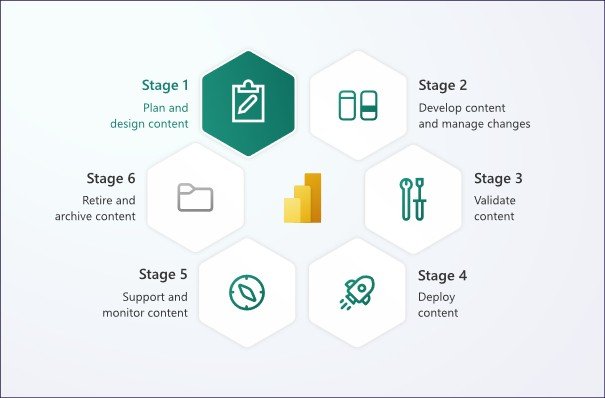
Source: Microsoft - Power BI implementation planning: Develop content and manage changes
As you can see, managing changes in content already starts at stage 2 "Develop content and manage changes" of the lifecycle. It does mean we need to take version history account from early on.
1) start with the real problem: power bi has two "version histories"
Most teams mix these up:
A) "document history" (file rollback)
If your PBIX/PBIP lives in SharePoint/OneDrive, you do get basic version restore. It's not DevOps, but it allows you to roll back to earlier versions.
Use it for: one person developing one semantic model, early prototypes, emergency rollback.
Don't confuse it with: code review, branching, automated deployments, or checking differences between two versions
B) "engineering history" (source control + releases)
This is Git + pull requests + tags + release notes + repeatable deployments. To get there, your Power BI assets must be comparison-friendly and your deployment process must be environment-aware.
2) The key shift: treat the semantic model as code
Most Power BI "CI/CD pain" comes from one fact: PBIX is a binary container. Binaries don't compare or merge well. That's why text-based representations matter.
You now have multiple ways to make model/report artifacts source-controllable:
PBIP (Power BI Project) decomposes content into folders/files (report + model). It's tightly connected to the "developer mode" direction that's been discussed widely in the community.
TMDL / text-based model metadata workflows are increasingly common for versioning semantic model changes (because Git can diff them meaningfully).
Tabular Editor + Git is a very mature path, especially when you combine Git integration with professional model editing and governance.
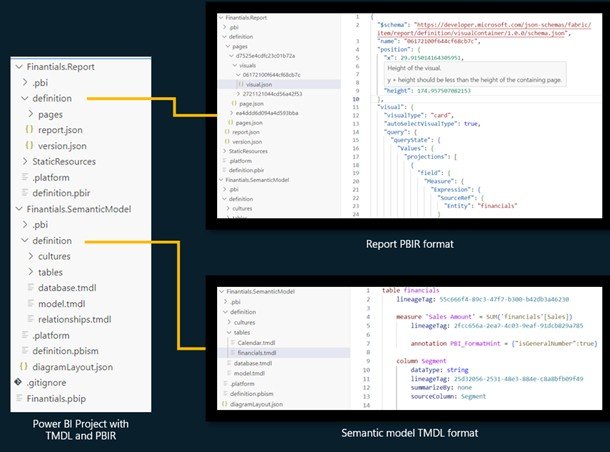
Power BI project file structure
Source: Microsoft: PBIR for Power BI Project files (PBIP)
Under-discussed insight for developers with medior experience and up:
We'd recommend having stricter engineering for your model than your report. Measures, calculation groups, relationships, RLS, and naming conventions are "core logic". Visual layout is "UI". Put your strongest controls (PR reviews, quality gates, branching discipline) around the semantic model first.
3) Deployment pipelines: great -- but know what they actually do (and don't do)
Deployment pipelines in Fabric/Power BI provide a structured path (Dev ? Test ? Prod) with supported items and deployment rules to adjust configuration between stages.
This is where many teams stop. It works but it's important to understand two realities:
- Deployment rules are configuration management
You can switch:
Data sourcesLakehousesWarehousesParameters
2. Metadata deployment ? Data validation
Pipelines move metadata, but they do not guarantee:
Correct refreshPartition behaviorData correctnessRLS integrity
4) git integration - Ci/cd becoming real
Fabric's Git integration connects a workspace to a repository, so changes can be committed/pulled as part of a lifecycle process.
This unlocks:
PR reviews for model changes
Branching strategies (feature branches, release branches)
Automated checks (linting, best-practice rules, naming conventions)
Traceability: "who changed what, why, and when"
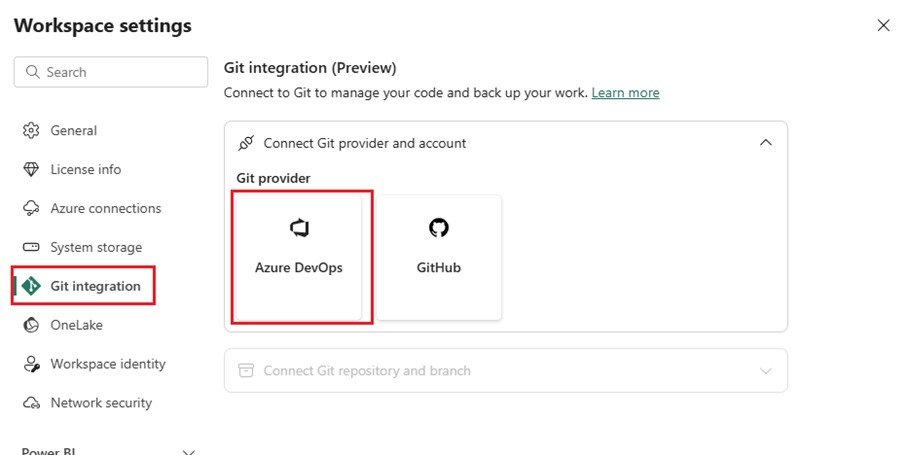
Frequently made mistakes
Teams often drift into a messy middle where some changes happen in Desktop, some in Service, some directly in the repo. Pick a rule and enforce it.
Here are some guidelines to follow:
Git is the source of truth
Dev workspace is the "integration environment"
Test/Prod only change via deployment pipeline
5) finally, a blueprint that works in the real world
Step 1 - Choose your artifact strategy
If you're still PBIX-only: start by versioning at least the semantic model via a text-friendly approach (PBIP/TMDL/TE workflow).
If you already have Fabric workspaces: connect Git integration early.
Step 2 - Define environments and ownership
Dev: messy, collaborative, fast
Test: controlled data + validation
Prod: stable, audited, limited permissions
Step 3 - Put quality gates where they matter
This is a huge blind spot in many setups: deployment automation without quality automation just ships mistakes faster.
Add at least one gate:
Best Practice Analyzer rules (naming, measure formatting, relationships, etc.) before merging/deploying
A short checklist tied to endorsements (Promoted/Certified) for what "done" means (documentation, RLS, performance quick check)
Step 4 - Handle configuration and secrets properly
What changes between Dev/Test/Prod?
data sources / lakehouse / warehouse
parameters
refresh schedules / credentials
feature flags (sometimes: calc groups, preview features)
Use deployment rules where possible and keep a simple "config matrix" in the repo (even a small JSON/YAML file) so the team can see what differs per stage. Deployment rules are a first-class concept in pipelines.
5) Topics that aren't talked about enough (and will save you time later)
1) "merge conflict design"
If three people edit the same measures table, you'll conflict. Reduce conflicts by design:
split responsibilities (one owner for core model, others for report pages)
modularize where possible (calc groups, measures folders, display folders)
2) Data + metadata are different deployment concerns
Deployment pipelines can move artifacts, but data recency and refresh behavior still need explicit validation. The "it deployed fine" moment is not the same as "it works in production".
3) Testing RLS is part of CI/CD
Medior teams often only test RLS right before go-live (or after a complaint). Put it in your checklist every time.
4) Thin reports and shared semantic models change everything
Once multiple reports depend on one model, deployment becomes dependency management. Plan it like an API:
semantic model changes need versioning, release notes, and compatibility thinking
deprecate measures and columns like you deprecate endpoints:
Mark it as deprecated
Communicate the change
Provide an alternative
Allow transition time
Remove it in a controlled release
Wrap up
Now, with this knowledge you have a good overview of which direction to take to manage version history and deployment within your team/organization. First of all, we learned that there's no onesize-fits-all. Take into consideration the available licensing, skills, and organizational needs. Next, a mindset shift: treat the semantic model as code, not as a file. Use deployment pipelines for environment separation, but remember they manage metadatanot data validation. Introduce Git early, enforce it as the single source of truth, and place quality gates around core model logic. Finally, design for scale: separate data from metadata concerns, test RLS systematically, and manage shared semantic models like APIs. Governance implemented early prevents operational risk later.
Call-to-Action
Feel free to share your experiences and learnings with version history and CI/CD in Power BI. Don't forget to explore Microsoft's documentation and resources for even more possibilities. Do not hesitate to reach out if you have any questions about the blog and how the tools and methods mentioned in this article relate to your specific use case.
Want to implement this in your workflow, too?

Karim Chrouabi
Karim is a certified Microsoft Power BI Data Analyst with several years of consulting experience. He covers the full cycle from ETL pipelines to visualization, with a particular focus on operations and insurance analytics. He has a habit of automating anything repetitive, which means he's always discovering new tools in the process.